When you run a business in Singapore, your website is often the first thing potential customers see. It is your digital shopfront, open 24 hours a day, seven days a week. But just like a physical store, your website needs regular maintenance to stay in top shape. Without it, you risk slow loading times, broken features, security vulnerabilities, and ultimately, lost business.
Many small business owners think website maintenance is only about updating content or adding new pages. The reality is much broader. Your website is built on software, servers, databases, and third-party services, all of which need attention over time. Ignoring maintenance does not make problems disappear. It makes them more expensive to fix later.
This guide gives you a complete maintenance checklist broken down by timeframe. Whether you have five minutes a day or a few hours set aside each quarter, you will know exactly what to do. No technical background required. If you can use a computer, you can handle most of these tasks yourself.
Why Regular Website Maintenance Matters for Singapore Businesses
Singapore has one of the highest internet penetration rates in the world. Your customers expect your website to load fast, work perfectly on their phones, and keep their data safe. A site that is slow or broken sends them straight to your competitor.
Beyond customer experience, regular maintenance protects your investment. A website is not a one-time purchase. It is a living asset that requires ongoing care. Think of it like maintaining a car. You would not change the oil once and forget about it for five years. Your website needs the same consistent attention.
Search engines like Google also reward websites that are fast, secure, and well-maintained. Regular maintenance directly supports your SEO efforts and helps you rank higher in search results when potential customers look for businesses like yours.
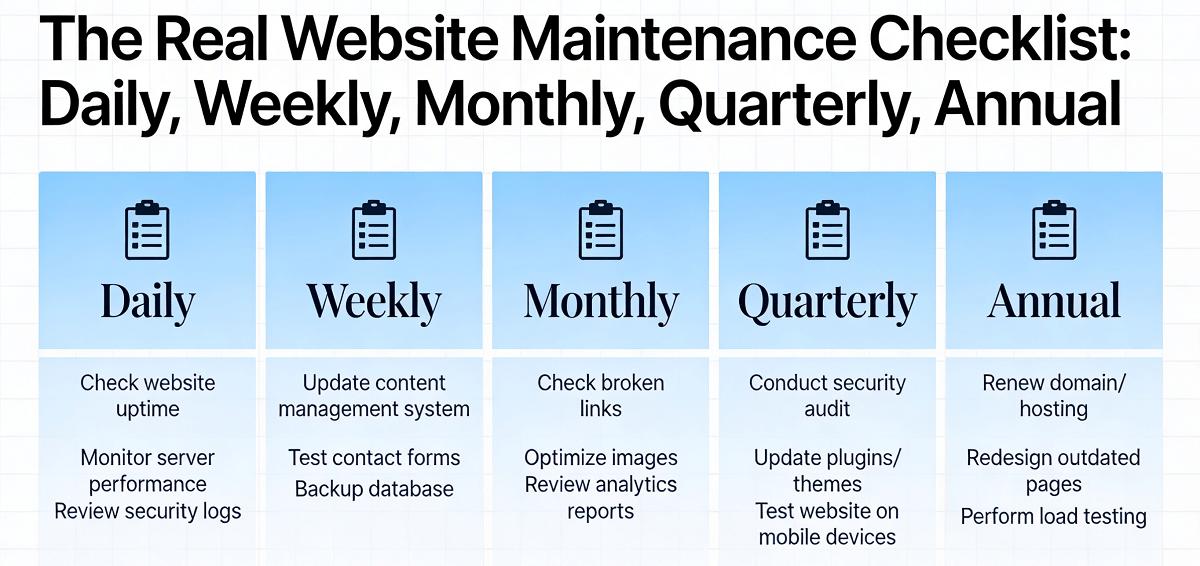
Daily Website Maintenance Tasks
These tasks take only a few minutes but make a big difference over time.
1. Check Your Website Uptime
Use a free tool like UptimeRobot or StatusCake to monitor whether your website is accessible. These services send you an alert the moment your site goes down. The faster you know about a problem, the faster you can fix it. For businesses that rely on online bookings or sales, even an hour of downtime can mean lost revenue.
2. Review Any Error Messages or Failed Submissions
Log into your website admin panel once a day and check for any error messages, failed contact form submissions, or unusual activity. Many content management systems show a dashboard with recent errors or failed attempts. Catching these early prevents bigger problems down the road.
3. Verify Key Pages Are Loading Correctly
Open your website in a private or incognito browser window and navigate through your most important pages. Check that images load, buttons work, and forms submit properly. Doing this daily takes less than five minutes and gives you peace of mind.
Weekly Website Maintenance Tasks
Set aside 30 minutes to an hour each week for these tasks.
4. Install Software Updates
If your website runs on a platform like WordPress, Shopify, or another content management system, check weekly for available updates. These updates often include security patches, bug fixes, and performance improvements. Most platforms make this easy by showing an notification badge when updates are available. Do not ignore these notifications.
5. Review Your Website Analytics
Log into Google Analytics or your built-in analytics dashboard and review key metrics from the past week. Look at your traffic numbers, bounce rate, and which pages are most popular. Are there any sudden drops in traffic? Are people leaving quickly on certain pages? This data tells you what is working and what needs attention.
6. Check All Links Are Working
Broken links frustrate visitors and hurt your SEO. Use a free tool like Dead Link Checker to scan your website for broken links. Fix any you find by updating the link address or removing the broken link entirely. This takes less than 15 minutes and keeps your site professional.
7. Review Spam and User Comments
If your website has a blog, forum, or comment section, check weekly for spam comments and inappropriate content. Delete spam and flag any malicious links. Some platforms have automated spam filters, but it is worth checking manually to make sure nothing harmful gets through.
Monthly Website Maintenance Tasks
Dedicate one to two hours each month to these more involved tasks.
8. Perform a Full Backup
Back up your entire website, including all files, databases, images, and content. Store the backup in a secure offsite location, such as Google Drive, Dropbox, or an external hard drive. If something goes wrong during an update or a hacker attack, you can restore your site quickly. Many hosting providers offer automatic backups, but verify they are actually running and test restoring from a backup occasionally.
9. Test All Forms and Interactive Features
Submit a test entry through every form on your website, including contact forms, newsletter signups, quote request forms, and checkout processes. Check that you receive the submissions in your email inbox and that they are stored correctly in your backend. Forms are one of the most commonly broken features on websites, and customers rarely tell you when they fail.
10. Review and Update Content
Go through your key pages and update any outdated information. This includes prices, service descriptions, business hours, contact information, and team bios. Keeping your content fresh shows visitors you are active and engaged. It also helps with SEO since search engines favor websites with current information.
11. Check Mobile Responsiveness
Open your website on a smartphone and a tablet to check how it looks and functions. Are buttons easy to tap? Is text readable without zooming? Is navigation simple on smaller screens? With more people browsing on mobile devices than ever before, mobile responsiveness is critical. If something looks broken on mobile, flag it for fixing.
12. Review Security Settings
Check your website security settings and ensure your admin accounts have strong, unique passwords. Update passwords regularly and consider enabling two-factor authentication if your platform supports it. Review who has access to your website backend and remove any accounts that are no longer needed.
Quarterly Website Maintenance Tasks
Every three months, set aside a few hours for these deeper maintenance tasks.
13. Update All Plugins and Extensions
Beyond your core platform, check all third-party plugins, extensions, and themes for updates. Outdated plugins are one of the most common ways hackers gain access to websites. Enable automatic updates for trusted plugins, but review any major updates manually to ensure they do not break your site.
14. Review and Optimize Database
Over time, your website database collects temporary data, spam comments, old revisions, and other clutter that slows things down. Use a database optimization tool or ask your hosting provider to clean up unnecessary data. This can significantly improve your website loading speed.
15. Test Emergency Recovery Procedures
Run a test restore from your most recent backup. Verify that all files, databases, and configurations are restored correctly. This is especially important if you have made significant changes to your site since the last backup. There is no point having a backup if you do not know how to use it.
16. Review Third-Party Services and Integrations
Check that all third-party services connected to your website are still working correctly. This includes payment gateways, email marketing integrations, social media links, and analytics tracking codes. Remove any integrations that are no longer used and update credentials for services that have changed.
Annual Website Maintenance Tasks
Once a year, conduct a comprehensive review of your entire online presence.
17. Renew Your Domain Name and SSL Certificate
Check when your domain name registration expires and renew it well in advance. Same for your SSL certificate, which keeps your site secure. Missing a renewal can take your website offline temporarily, and restoring it can be costly and time-consuming. Set calendar reminders at least 30 days before expiration.
18. Conduct a Full Security Audit
Run a thorough security scan using a tool like Sucuri, Wordfence, or SiteLock. Look for malware, vulnerabilities, outdated files, and any signs of unauthorized access. Address any issues immediately. If you are not comfortable doing this yourself, hire a professional to do a complete security audit.
19. Review Your Hosting Needs
Evaluate whether your current hosting plan still meets your needs. Has your traffic grown significantly? Are you experiencing slow loading times or frequent downtime? It might be time to upgrade to a more powerful hosting plan. Conversely, if your traffic is low and you are paying for more resources than you need, consider a cheaper plan.
20. Audit Your Overall Website Performance
Run a full performance test using Google PageSpeed Insights, GTmetrix, or Pingdom. Check your loading speed, time to first byte, and overall user experience score. Identify the biggest bottlenecks and create a plan to address them. Even small improvements in loading speed can significantly reduce bounce rates and improve conversions.
21. Plan for the Coming Year
Set goals for your website for the next 12 months. Do you want to launch a new product? Improve your SEO rankings? Redesign certain pages? Having a clear plan keeps you focused and ensures your website continues to grow with your business.
Making Maintenance a Habit
Create a simple schedule and stick to it. Block time on your calendar for maintenance tasks just like you would for any other important business activity. Some business owners find it helpful to combine maintenance with their regular content updates, doing both on the same day each week.
If you find maintenance tasks overwhelming or do not have the time, consider hiring a professional service to handle everything for you. The cost is often much lower than you would expect, and it frees you up to focus on running your business.
If you still need help, feel free to contact us at https://webcare.sg/contact for a free website health check.