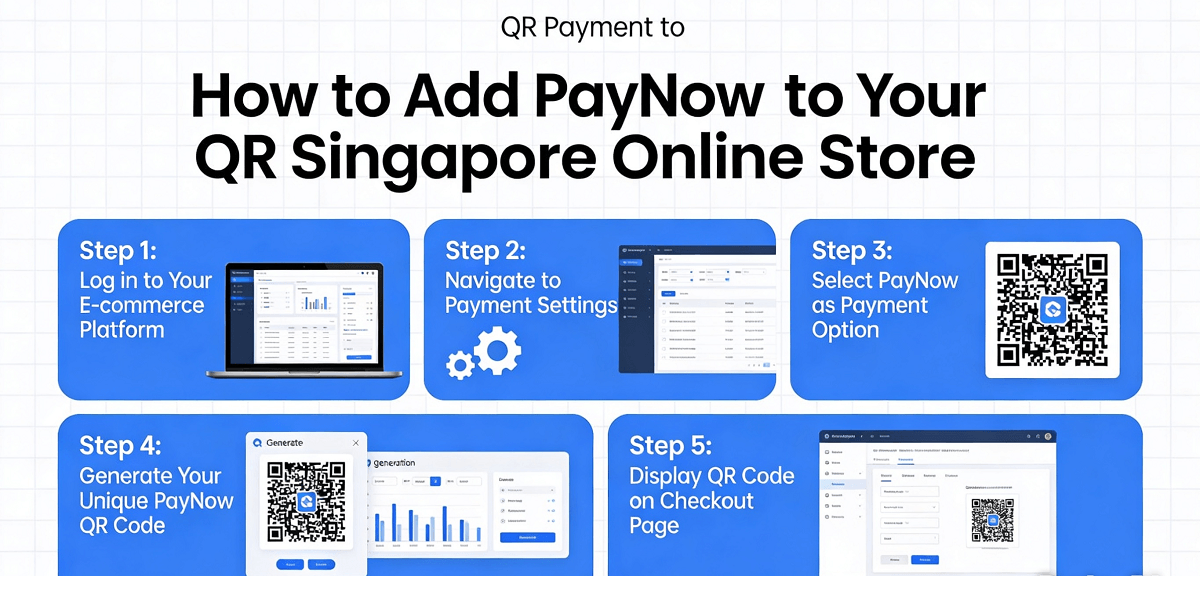
If you run an online store in Singapore and you are not offering PayNow as a payment option, you could be losing customers. Studies show that shoppers who have more payment options tend to complete their purchases more often. PayNow is one of the most popular instant payment methods in Singapore, with over 2.5 million users registered. When customers see the PayNow option at checkout, they feel more confident because they know their payment will go through instantly. No waiting for bank transfers to clear. No worrying about cash on delivery not being available. Just a quick scan and the order is done.
For many Singapore small business owners, adding PayNow might sound technical and complicated. You might think you need to hire a developer or sign up for expensive payment gateways. The good news is that adding PayNow QR payment to your online store is actually simpler than you think. In this guide, I will walk you through the entire process step by step, using plain language and no technical jargon. By the end of this article, you will have PayNow working on your store and ready to accept payments from customers instantly.
Before we begin, let me explain what PayNow actually is. PayNow is a peer to peer payment service that allows users in Singapore to transfer money instantly using their mobile banking apps. It is linked to your Singapore bank account and works 24 hours a day, 7 days a week, including weekends and public holidays. When you add PayNow to your online store, customers can scan a QR code with their phone and pay you directly from their bank account. The money arrives in your account within seconds, not days like some other payment methods.
Here is why Singapore online stores need PayNow. First, it reduces cart abandonment. Many customers add items to their cart but leave when they do not see a payment method they like. Having PayNow gives them another option. Second, it builds trust. PayNow is a recognised Singapore brand and customers feel safe paying through it. Third, it is free for customers to use. Unlike credit card payments where customers pay a surcharge, PayNow costs nothing extra for your buyers. Fourth, it is fast. The confirmation is immediate so you can process orders faster and ship sooner.
Step 1: Set Up Your Business Bank Account for PayNow
Before you can receive PayNow payments on your website, you need to have a Singapore bank account that supports PayNow. Most major banks in Singapore offer PayNow. These include DBS, OCBC, UOB, Standard Chartered, and Maybank. If you already have a business bank account with any of these banks, you are likely already set up for PayNow.
Log in to your online banking portal or mobile app and look for the PayNow section. You may need to register your business mobile number or email as the PayNow identifier. This is the number or email that customers will use to send you money. Write this down because you will need it later when setting up your online store.
Some banks require you to set up a corporate PayNow account separately from your personal PayNow. If you are using a sole proprietorship account, your existing PayNow for personal use may work. However, for a private limited company, you likely need to register a corporate PayNow account with your bank. Visit your bank is website or call their customer service to confirm the process.
Once your PayNow is active, you will receive a unique PayNow proxy. This could be your mobile number, email address, or a UEN number. Your bank will show you this in your dashboard. Keep this information handy because you will need it when we set up your store is payment integration.
Step 2: Choose Your Online Store Platform
The next step is to understand what platform your online store runs on. Different platforms have different ways of adding PayNow. The most common platforms used by Singapore businesses are Shopify, WooCommerce, Wix, Squarespace, and custom built websites. Knowing your platform will determine which instructions to follow.
Shopify is one of the most popular platforms worldwide. If your store runs on Shopify, you can add PayNow through various apps available in the Shopify App Store. WooCommerce is a plugin for WordPress websites. If you use WooCommerce, there are free plugins that let you add PayNow as a payment option. Wix and Squarespace also have their own app marketplaces where you can find PayNow integration tools.
For this guide, I will focus on the most widely used platforms. However, the core concept remains the same across all platforms. You need a payment plugin or app that generates a PayNow QR code for your customer. The app connects to your PayNow account so when a customer pays, the money goes directly into your bank account.
Step 3: Install a PayNow Payment Plugin or App
Now that you know your platform, it is time to install a PayNow payment solution. Here are the options for the most common platforms.
For Shopify users, go to the Shopify App Store and search for PayNow or QR payment. Look for apps that support Singapore PayNow specifically. Some popular options include QR King, PayNow Checkout, and Hellopay Singapore. Read the reviews and check the features before installing. Most of these apps offer a free trial period so you can test them first. Install the app that looks most suitable for your needs.
For WooCommerce users, log in to your WordPress dashboard and go to Plugins, then Add New. Search for PayNow or GrabPay because many GrabPay plugins also include PayNow. One popular free plugin is called WooCommerce PayNow and GrabPay Gateway. Install and activate the plugin, then go to WooCommerce Settings, then Payments. Enable the PayNow option and enter your PayNow proxy details.
For Wix users, go to the Wix App Market and search for payment apps that include PayNow. Some payment apps in Wix allow you to add multiple payment methods including PayNow. Install the app and follow the setup wizard. You will need to enter your business details and PayNow information.
For Squarespace users, the process is similar. Go to the Commerce section in your Squarespace settings and look for Payment Methods. While Squarespace does not have native PayNow support in Singapore, you can use external payment apps or payment links generated by your bank.
Step 4: Configure Your PayNow Settings
After installing the plugin or app, you need to configure it properly. The configuration process varies slightly depending on which solution you use, but the basic information required is the same.
First, enter your PayNow proxy. This is the mobile number, email, or UEN that your bank gave you when you registered for PayNow. The plugin will use this to generate unique QR codes for each transaction. Second, enter your business name. This is what your customers will see when they scan the QR code. Make sure it matches your business registration name exactly.
Third, set the payment amount limits if needed. Some plugins let you set minimum and maximum payment amounts. For most online stores, you can leave these at the default settings. Fourth, choose the currency. Make sure Singapore Dollar is selected. PayNow only works in SGD so if you have multi-currency settings on your store, ensure PayNow transactions are set to SGD.
Fifth, configure the confirmation settings. Decide whether you want the order to be automatically confirmed when payment is received, or if you want to manually verify each payment. For most stores, automatic confirmation is fine because PayNow payments are instant and reliable. However, for high value orders, some store owners prefer to manually verify before shipping.
Step 5: Test Your PayNow Integration
Before going live, you must test the PayNow integration to make sure everything works. Never skip this step. Testing prevents embarrassing payment failures when real customers try to pay.
Create a test order on your store. Add something to your cart and proceed to checkout. Select PayNow as the payment method. You should see a QR code appear on the screen. Use your own mobile banking app to scan the QR code and make a small payment to yourself. This tests the entire flow from your store generating the QR code to the payment arriving in your account.
Check that your store receives the payment confirmation. The order status should update to reflect that payment was received. If you have email notifications set up, you should receive an email confirming the order. If you have accounting software connected, the transaction should sync there as well.
Common testing issues include the QR code not appearing, the payment not being recognized, or the order not updating. If you encounter any of these, check your plugin settings first. Make sure the PayNow proxy is entered correctly without any spaces or country code prefixes. If the issue persists, contact the plugin developer is support team for help.
Step 6: Add Instructions for Your Customers
Once testing is complete and everything works, you need to help your customers understand how to pay with PayNow. Many Singapore shoppers already know how to use PayNow, but some may need guidance, especially first time online shoppers.
Add a help section near the checkout page explaining the steps to pay with PayNow. Keep it simple. Explain that they need to open their mobile banking app, scan the QR code, verify the amount and business name, and confirm the payment. You can also add a short video tutorial if your platform supports embedding videos.
Make sure your return policy and contact information are clearly visible. Customers feel more comfortable making a payment when they can see that your business has clear policies and a way to reach you if something goes wrong.
Step 7: Promote Your New Payment Option
Now that PayNow is working on your store, let your customers know. Update your social media profiles with the news. Add a banner on your website is homepage announcing the new payment option. Send an email to your existing customer list telling them about PayNow.
Consider offering a small incentive for using PayNow. Some stores offer a small discount for customers who pay via PayNow because it saves them transaction fees compared to credit cards. Even a one or two percent discount can be enough to encourage adoption.
Update your Google My Business listing and other online directory listings to mention that you accept PayNow. This helps attract new customers who specifically look for stores with this payment option.
Step 8: Monitor and Maintain Your PayNow Integration
Setting up PayNow is not a one time task. You need to monitor it regularly to ensure it continues working properly. Check your bank statements regularly to confirm that PayNow payments are arriving correctly. If you notice any discrepancies, investigate immediately.
Keep your payment plugins and apps updated. Developers release updates to fix bugs and improve security. Log into your store dashboard regularly to check for available updates. Outdated plugins can cause payment failures or security vulnerabilities.
If you change your bank account or phone number, update your PayNow proxy immediately. The old proxy will stop working and you could miss payments. Most banks let you update your PayNow proxy through their online banking portal.
Keep records of all PayNow transactions. This is important for your accounting and for resolving any disputes. Most payment plugins keep transaction logs, but it is also good practice to maintain your own spreadsheet of PayNow payments received.
Understanding PayNow Transaction Fees
One of the best things about PayNow for Singapore small businesses is that there are no transaction fees like credit card processing fees. When a customer pays you via PayNow, the full amount goes into your account. There is no percentage taken by the payment processor. This is unlike credit card payments which typically charge 2 to 3 percent per transaction.
However, some payment apps or plugins may charge a small monthly fee or per transaction fee. Before choosing a PayNow solution, check if there are any fees involved. There are free options available, especially for WooCommerce. Even for Shopify, there are apps with no monthly fees. Read the pricing details carefully before installing.
While PayNow itself is free, remember that your bank may charge fees for corporate accounts. Check with your bank about any monthly fees or transaction fees for receiving PayNow payments into your business account. Most banks offer free PayNow for retail customers but may charge small fees for business accounts.
Troubleshooting Common PayNow Issues
Even with careful setup, issues can occasionally occur. Here are common problems and how to fix them.
If customers say they paid but your store shows no order, first check your bank account to confirm the payment arrived. If it did, the issue is with your plugin is communication. Check your plugin settings and make sure webhooks are properly configured. A webhook is a signal that tells your store when a payment is received. If the webhook is not working, your store will not know about the payment.
If the QR code is not displaying, check if your plugin is properly installed and activated. Try clearing your website is cache if you use a caching plugin. Sometimes the QR code image fails to load due to a conflict with other plugins or themes. Try disabling other plugins temporarily to identify the conflict.
If payments are going to the wrong account, this means your PayNow proxy is incorrect. Double check the proxy in your bank is settings and enter it again in your plugin. This is a critical field so take your time to ensure accuracy.
If customers report that they cannot find the PayNow option at checkout, make sure the payment method is enabled in your store settings. Go to your payment settings and confirm that PayNow is turned on and visible to customers.
Going Beyond PayNow: Accepting Other Payment Methods
While PayNow is excellent for your Singapore customers, consider adding other payment options for international customers or those who prefer different methods. Credit card payments through platforms like Stripe or PayPal are still important for many customers.
Some stores also add GrabPay which works similarly to PayNow and is popular among younger shoppers. Bank transfers are another option although they are slower and require manual verification.
The goal is to offer as many payment options as practical without complicating your checkout process too much. Research shows that offering two to four payment options optimises conversion rates. Too few options and you lose customers who do not like your default method. Too many options and customers feel overwhelmed and abandon their carts.
Final Thoughts
Adding PayNow to your Singapore online store is one of the best decisions you can make for your e-commerce business. It gives your customers a fast, free, and trusted payment option that increases conversion rates and reduces cart abandonment. The setup process is simpler than most people think, and there are free tools available so it does not cost you anything extra.
Follow the steps in this guide carefully, test thoroughly before going live, and monitor your integration regularly. Once PayNow is working smoothly, you will wonder how you ever managed without it. Your customers will appreciate the convenience, and your business will benefit from faster payments and improved cash flow.
If you still need help, feel free to contact us at https://webcare.sg/contact for a free website health check.