As a Singapore business owner, you probably invest in multiple marketing channels — Facebook ads, Instagram posts, LinkedIn campaigns, email newsletters, and perhaps even collaborations with influencers or partner websites. But here is a frustrating question: do you actually know which of these efforts brings visitors to your website? Without proper tracking, you are essentially throwing marketing dollars into a black hole and hoping for the best.
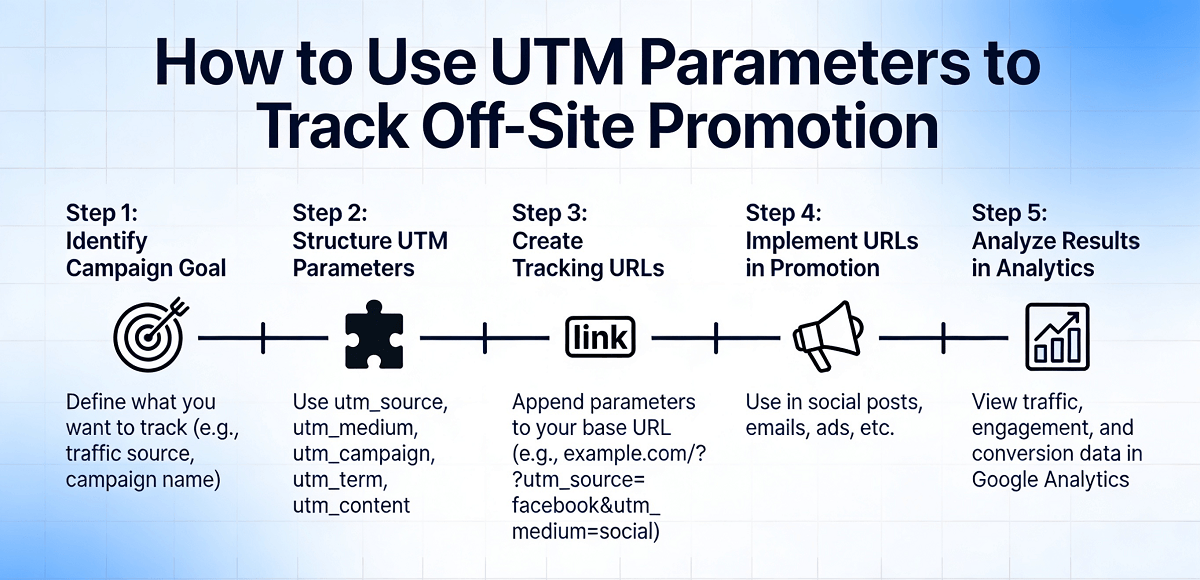
This is exactly why UTM parameters matter. UTM (Urchin Tracking Module) parameters are simple text tags that you add to your URLs which allow Google Analytics and other tracking tools to identify exactly where each visitor came from. When someone clicks a link with UTM parameters, Analytics captures that information and shows you precisely which campaign, source, and medium brought them to your site. For a small business in Singapore where every marketing dollar counts, this level of clarity is not a luxury — it is essential for making smart, data-driven decisions about where to invest your budget.
The good news is that UTM parameters are completely free to use and require no technical expertise beyond adding a few extra pieces of text to your links. This guide will walk you through everything you need to know, step by step, so you can start tracking your off-site promotions accurately and confidently.
What Exactly Are UTM Parameters?
Before we dive into the how-to, let us briefly explain what UTM parameters actually are so the terminology does not feel intimidating. When you create a URL with UTM parameters, it looks something like this:
https://www.yourwebsite.com/page?utm_source=facebook&utm_medium=social&utm_campaign=spring_sale_2026
Those extra pieces starting with "utm_" are the UTM parameters. There are five types you can use, but you only need to understand three of them to get started effectively.
The Three Core UTM Parameters You Need to Know
The first parameter is utm_source. This identifies the specific platform or website where your link appears. For example, if you are promoting your page on Facebook, your utm_source would be "facebook". If you are running a newsletter through MailChimp, your utm_source would be "mailchimp". The source tells you the broad category of where your traffic originates.
The second parameter is utm_medium. This describes the marketing type or channel category. Continuing from the example above, if your Facebook post is a social media post, your utm_medium would be "social". If your MailChimp effort is an email campaign, your utm_medium would be "email". The medium helps you categorize the type of marketing activity.
The third parameter is utm_campaign. This identifies the specific promotional campaign or promotion name you are running. For instance, if you are running a Chinese New Year sale campaign in January 2026, your utm_campaign might be "cny_2026_sale". This parameter lets you track individual campaigns across different sources and mediums.
Why This Matters for Singapore Business Owners
Singapore has one of the most digitally connected populations in the world, with mobile penetration rates exceeding 150 percent. Your potential customers are scattered across multiple platforms — Instagram, TikTok, Facebook, WhatsApp business groups, email newsletters, partner websites, and more. Without UTM tracking, you have no way of knowing which of these channels actually drives real visitors to your website.
Consider this common scenario: You run a promotion simultaneously on Facebook and through an email newsletter. A customer visits your site, browses around, and eventually makes a purchase. Without UTM parameters, Google Analytics might show that visitor came from "direct" traffic, meaning it has no idea where they actually came from. With UTM parameters, you would see exactly whether that sale came from your Facebook post or your email campaign — information that directly shapes your future marketing budget decisions.
Step 1: Choose a UTM Parameter Builder
The first step is to use a UTM parameter builder tool. While you can technically write these URLs manually, a builder tool ensures your parameters are formatted correctly and handles special characters automatically. Google provides a free Campaign URL Builder that works perfectly for most needs. Simply search for "Google Campaign URL Builder" or visit the Google Analytics website to access it. Alternatively, tools like UTM.io, Terminus, or Bitly also offer UTM building capabilities with additional features like link management and team collaboration.
For this guide, we will use the Google Campaign URL Builder since it is free, straightforward, and widely used by businesses of all sizes.
Step 2: Identify Your Base URL
Your base URL is the actual webpage you want to send visitors to. This could be your homepage, a specific product page, a promotion landing page, or any other page on your website. In the Google Campaign URL Builder, you will find a field labeled "Website URL" where you enter this address.
Make sure you enter the full URL including "https://" at the beginning. For example, if your Singapore business sells handmade jewelry and you want to send people to your promotional page for a Mother's Day bundle, your base URL might look like "https://www.yourjewelryshop.com.sg/promotions/mothers-day-bundle".
Step 3: Fill In Your Source Parameter
In the Campaign URL Builder, you will see a field labeled "Campaign Source." This is where you identify where the link will be placed. Think carefully about the specific platform name. Common examples for Singapore businesses include "facebook", "instagram", "tiktok", "linkedin", "google", "email", "newsletter", "partner_website_name", or even specific publication names like "straitstimes" or "channelnewsasia".
Be consistent with your naming conventions. If you use "facebook" in one campaign, do not switch to "fb" or "Facebook" in another, as this will create separate entries in your analytics and fragment your data. Always use lowercase for consistency.
Step 4: Fill In Your Medium Parameter
Next, you will fill in the "Campaign Medium" field. This describes the type of marketing channel. Think about the broader category of your activity rather than the specific platform. Standard medium values include "social" for social media platforms, "email" for email campaigns, "cpc" or "ppc" for paid search advertising, "banner" for display ads, "referral" for links on other websites, and "organic" for non-paid search results.
For Singapore businesses running Instagram influencer collaborations, you might use "social" as your medium. For a promotional email sent through your MailChimp newsletter, "email" would be appropriate. For a Facebook paid ad, you might combine "cpc" as the medium with "facebook" as the source.
Step 5: Fill In Your Campaign Parameter
The "Campaign Name" field is where you identify the specific promotion or campaign you are running. This should be descriptive enough that you can easily identify it later in your analytics reports. Use lowercase letters and underscores or hyphens to separate words, never spaces or special characters.
For example, if you are running a National Day promotion in August 2026, your campaign name might be "national_day_2026" or "ndp2026_promo". If you are running a clearance sale in June, "june_clearance_2026" works well. The key is making it immediately recognizable to you or your marketing team months later when you are reviewing the data.
Step 6: Generate and Copy Your UTM URL
Once you have filled in all three required fields, the Campaign URL Builder will automatically generate your complete UTM URL. You will see a "Copy Link" button or can manually copy the generated URL from the output field. Test it by copying the URL and pasting it into your browser — you should see your base URL with the UTM parameters appended at the end.
Take a moment to verify that all parameters are correct before proceeding. The generated URL should look something like: "https://www.yourwebsite.com.sg/promotions/mothers-day-bundle?utm_source=instagram&utm_medium=social&utm_campaign=mothers_day_2026".
Step 7: Use Your UTM URLs in Your Marketing Materials
Now comes the practical part — using these UTM URLs in your actual marketing activities. Replace your regular website links with UTM-tagged URLs wherever you are promoting your business online. This includes your social media posts, email newsletter buttons, paid advertisements, influencer collaboration agreements, WhatsApp broadcast messages, and any other off-site promotion pointing to your website.
For social media posts, use your UTM URL in the link that appears with your post, in your Instagram bio link, in your Facebook post link attachment, or in any Instagram Story swipe-up link if you have access to that feature. For email campaigns, replace the button or text link destinations with your UTM URL. For paid ads on Google, Facebook, or Instagram, you can append UTM parameters to the final URL field in your ad setup.
Step 8: Verify Your Data in Google Analytics
After you have been running your UTM-tagged campaigns for a few days or a week, log into your Google Analytics account and navigate to the "Acquisition" section. Click on "Traffic Acquisition" or "All Traffic" and then "Source/Medium" to see your data organized by source and medium. You can also navigate to "Acquisition" then "Campaigns" then "All Campaigns" to see data organized by individual campaign names.
You should start seeing your UTM data appear in these reports. For example, under Source/Medium, you will see entries like "instagram / social" showing the number of sessions, users, bounce rate, and conversions that came from your Instagram promotions. Under All Campaigns, you will see specific campaign names like "mothers_day_2026" with their respective performance metrics.
Understanding What the Data Tells You
Once you have UTM data flowing into Google Analytics, the real value emerges when you start analyzing it. Look at which sources and mediums bring the most visitors. Check which campaigns generate the highest engagement rates. Compare your cost per acquisition across different channels. This data empowers you to make informed decisions about where to increase your marketing investment and where to pull back.
For example, if you discover that your Instagram influencer collaborations bring significantly more traffic than your Facebook paid ads, you might decide to allocate more budget to Instagram partnerships in your next campaign. If your email newsletter consistently drives the highest conversion rate, you might invest in building a more robust email list. These insights are only possible when your links are properly tagged with UTM parameters.
Common Mistakes to Avoid
One common mistake is using inconsistent naming conventions. If you use "facebook" in some campaigns and "fb" or "Facebook" in others, Google Analytics treats these as entirely separate sources, fragmenting your data and making it impossible to get an accurate picture of your Facebook performance. Create a simple style guide for yourself and stick to lowercase naming throughout.
Another frequent error is forgetting to add UTM parameters to links after you have already started a campaign. UTM parameters only work from the moment they are implemented — they cannot retroactively track past traffic. Make UTM tagging a standard step in your campaign preparation process so you never miss capturing valuable data.
Some business owners also worry about UTM parameters making their URLs look messy or unprofessional. In reality, when someone clicks a UTM link, they are taken directly to the destination page — the UTM parameters are invisible to the visitor. The only person who sees the full UTM URL is you when you are reviewing your analytics data.
Advanced UTM Parameters for Further Customization
Once you are comfortable with the three core UTM parameters, you can optionally use two additional parameters for more granular tracking. The utm_term parameter is used to identify paid search keywords, though it is primarily relevant for Google Ads campaigns. The utm_content parameter is useful for distinguishing between different elements within the same campaign — for example, if you have two different email subject lines or two different ad creatives pointing to the same landing page.
For most small Singapore businesses, the three core parameters are sufficient for meaningful tracking. You can explore utm_term and utm_content as your needs become more complex, but do not feel pressured to use them immediately.
Organizing Your UTM Links for Future Reference
As your marketing activities grow, you will accumulate many UTM URLs across multiple campaigns and platforms. Keep a simple spreadsheet with columns for Campaign Name, Source, Medium, and the full UTM URL. This document serves as your reference guide and helps your entire team stay consistent with naming conventions. It also makes it easy to duplicate and modify URLs for future campaigns.
There are also paid tools like UTM.io orutm.io that provide link management platforms where you can store, organize, and track all your UTM URLs in one place. These tools can be valuable if you are running dozens of campaigns simultaneously, though they are not necessary for smaller operations.
How WebCareSG Can Help
Implementing UTM parameters is a straightforward process that any Singapore business owner can handle independently, but getting the most out of your analytics data often requires a deeper understanding of how all the pieces fit together. At WebCareSG, we help business owners not only set up proper tracking infrastructure but also interpret the data to make smarter marketing decisions. If you find yourself stuck at any point or if you would like a comprehensive audit of your current website tracking setup, we offer free website health checks to get you pointed in the right direction.
If you still need help, feel free to contact us at https://webcare.sg/contact for a free website health check.