If you run a business website in Singapore, you have probably heard about firewalls before. You might think a firewall is something that only big corporations need to worry about. But here is the truth: small and medium businesses in Singapore are actually among the most common targets for online attacks. Hackers often use automated tools to scan the internet for vulnerable websites, and they do not care if you are a small bakery in Geylang or a growing e-commerce store in Jurong. This is why understanding what a Web Application Firewall (WAF) is and whether you need one has become essential knowledge for every Singapore business owner who wants to protect their online presence.
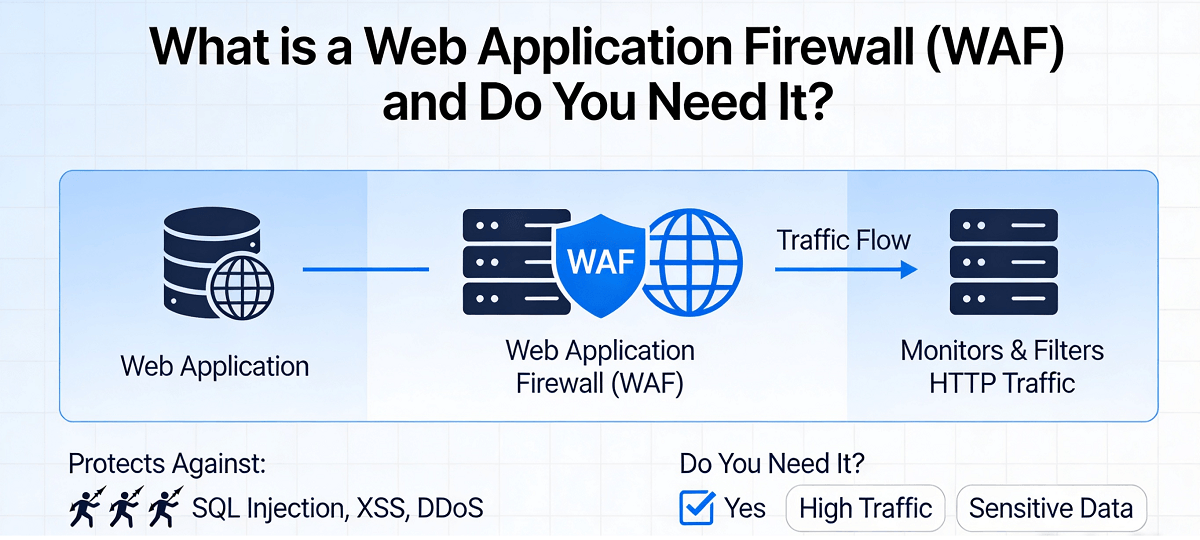
A Web Application Firewall, commonly abbreviated as WAF, is a security tool that sits between your website visitors and your web server. Think of it as a security guard standing at the entrance of your website. Every single request that tries to reach your website must pass through this WAF guard first. The guard checks each visitor to make sure they are legitimate and not trying to do anything harmful. If the WAF detects something suspicious, it blocks that request before it can ever reach your actual website code. This is fundamentally different from a traditional network firewall, which only filters traffic based on IP addresses and ports. A WAF understands your web application itself and can identify attacks that specifically target the way your website works.
Why should Singapore business owners care about this? Because website attacks are incredibly common and incredibly costly. According to recent studies, small businesses are the target of roughly forty-three percent of all cyber attacks globally. In Singapore specifically, the Cyber Security Agency reported thousands of cases each year, and many more go unreported. The average cost of a data breach for a small business can reach tens of thousands of dollars when you factor in website downtime, recovery costs, lost customers, and potential regulatory fines. For a small business operating on thin margins, this can be devastating. A WAF provides a crucial layer of protection that can stop many common attacks before they cause any damage at all.
How Does a WAF Actually Work?
Understanding the mechanics behind a WAF helps you appreciate why it is so effective. A WAF works by applying a set of security rules to every HTTP request that comes into your website. These rules are designed to identify and block common attack patterns. The most well-known attack pattern is called SQL injection, where attackers try to insert malicious database commands into forms on your website. Another common attack is cross-site scripting, or XSS, where hackers attempt to inject harmful scripts into your web pages that will then run in the browsers of your visitors. WAFs are excellent at detecting these patterns because they analyze the content of each request and look for suspicious keywords, unusual characters, or known attack signatures.
Modern WAFs use multiple detection techniques to be effective. Signature-based detection looks for known attack patterns that have been documented and catalogued. Behavior-based detection learns what normal traffic looks like for your specific website and then flags anything that seems abnormal. Some advanced WAFs even use machine learning to adapt and improve their detection capabilities over time. When a WAF detects a potential threat, it can take several actions depending on how it is configured. It might simply log the suspicious activity for your review, challenge the visitor with a CAPTCHA to prove they are human, block the request entirely, or even ban the IP address temporarily if it sees repeated attack attempts.
The Different Types of WAF Deployments
Before you decide to implement a WAF, you should understand that there are different ways to deploy one, and each approach has its own advantages and disadvantages. The three main deployment models are network-based WAFs, host-based WAFs, and cloud-based WAFs. Network-based WAFs are physical hardware devices that are installed at your data center. They offer high performance and low latency because they process traffic locally without going through the internet. However, they require significant upfront investment in hardware and need technical expertise to manage and maintain. For most small Singapore businesses, this option is usually overkill and too expensive.
Host-based WAFs are software applications that you install directly on your web server. They integrate closely with your web server software and give you complete control over the security rules. This can be powerful but also complex. You need server administration skills to install, configure, and maintain the software properly. If you are using shared hosting or a managed WordPress hosting service in Singapore, you typically cannot install a host-based WAF yourself. Cloud-based WAFs have become the most popular choice for small and medium businesses in recent years, and for good reason. With a cloud-based WAF, the security filtering happens in the cloud before traffic even reaches your web server. You do not need to install any hardware or software, configuration is usually handled through a simple web dashboard, and you get protection immediately without any changes to your existing infrastructure.
Step-by-Step Guide: How to Implement a Cloud-Based WAF for Your Singapore Website
If you have decided that a WAF makes sense for your business, here is a practical step-by-step guide to getting started with a cloud-based WAF solution. These steps assume you are not a technical expert, so we will keep things simple and actionable.
Step 1: Assess your current website security situation. Before implementing any new security measure, you need to understand what you are protecting. Take note of what platform your website runs on, whether it is WordPress, Shopify, a custom-built site, or something else. Identify what sensitive data you handle, such as customer names, email addresses, payment information, or login credentials. Check if you already have any security measures in place, such as SSL certificates, security plugins, or hosting-level protections. This assessment will help you choose the right WAF configuration and understand what threats are most relevant to your situation.
Step 2: Research and choose a WAF provider that suits your needs. There are several reputable cloud-based WAF providers that cater to small businesses and are available in Singapore. Popular options include Cloudflare, Sucuri, and AWS WAF. When evaluating providers, consider factors such as ease of setup, pricing plans, customer support quality, and whether they offer protection against the specific threats most relevant to your website platform. Many providers offer free tiers with basic protection that are sufficient for small websites. Read reviews from other Singapore business owners and do not hesitate to contact their support teams with questions before committing.
Step 3: Sign up and add your website to the WAF service. Once you have chosen a provider, create an account and follow their onboarding process to add your website. This typically involves entering your website URL and verifying that you own or control the domain. The verification process might require you to add a DNS record, upload a small file to your website, or make a small change to your website settings. Do not worry if this sounds technical; the providers usually offer step-by-step instructions and their support teams can help you if you get stuck. Take your time with this step because proper verification ensures the WAF can correctly route and protect your traffic.
Step 4: Configure your initial WAF settings. After your website is connected to the WAF, you will need to configure the security rules. Most WAF providers offer what they call pre-configured rule sets, which are sets of security rules that are appropriate for common website types. If you are using WordPress, look for a rule set specifically designed for WordPress sites as it will know which files and directories are normally accessed and which patterns indicate an attack. For e-commerce sites, ensure protection is enabled for login pages, checkout flows, and any pages that handle customer data. Start with the default recommended settings, as these are usually created by security experts to provide strong protection without causing issues for legitimate visitors.
Step 5: Review and adjust your security policies based on traffic patterns. In the first few days after enabling your WAF, pay attention to the alerts and logs it generates. Most WAF dashboards will show you what requests have been blocked and why. Check if any legitimate traffic is being blocked. Sometimes, your own internal team members or specific integrations might generate requests that look suspicious to the WAF. If you see false positives, you can create exceptions to allow those specific patterns through. This fine-tuning process is important because it ensures your security is tight without inadvertently breaking functionality for your real customers.
Step 6: Enable additional security features beyond basic WAF protection. Most comprehensive WAF services offer additional security features that you should consider enabling. DDoS protection guards against distributed denial of service attacks where hackers overwhelm your website with massive amounts of traffic. Bot management helps identify and block automated scripts that might be scraping your content or attempting to brute-force login credentials. Rate limiting can prevent a single IP address from making too many requests in a short period, which is a common technique used in certain types of attacks. Evaluate which of these additional features make sense for your business and enable them as needed.
Do You Really Need a WAF? Signs That Say Yes
Not every website absolutely requires a WAF, but there are several warning signs that indicate you should seriously consider implementing one. If your website handles any form of user input, such as contact forms, comment boxes, registration forms, or search fields, then you have a potential entry point for attackers and a WAF provides valuable protection. If your website is built on a popular platform like WordPress, Drupal, or Joomla, you become a target because attackers know these platforms well and have automated tools specifically designed to exploit vulnerabilities in them. If you process or store customer data, especially anything sensitive like payment information or personal identification details, then protecting that data is both an ethical obligation and often a legal requirement under Singapore's Personal Data Protection Act.
Another clear sign you need a WAF is if your website has experienced attacks or suspicious activity in the past, even if those attacks were not successful. If you are seeing strange traffic patterns, unexpected server resourceusage spikes, or unusual file changes on your hosting account, these are all red flags. Even if you have not been attacked yet, if your website is important to your business and losing access to it would cause significant disruption or financial loss, then investing in a WAF is a smart preventative measure. The cost of prevention is almost always much lower than the cost of dealing with an actual security incident.
Common Misconceptions About WAFs
Many business owners have misconceptions about WAFs that prevent them from making informed decisions. One common myth is that a WAF makes your website completely unhackable. This is simply not true. A WAF is a powerful security tool but it is not a silver bullet. Determined and sophisticated attackers can sometimes find ways around WAF protections, especially if they use zero-day exploits that the WAF has never seen before. However, a WAF will stop the vast majority of automated attacks and opportunistic hackers who are just scanning for easy targets. Another misconception is that WAFs significantly slow down your website. While there is some overhead involved in filtering traffic, reputable cloud-based WAFs are designed to minimize latency and many businesses actually see improved performance because they also offer caching and content delivery network features.
Some business owners also believe that WAFs are only for large enterprises with dedicated IT security teams. This could not be further from the truth. In fact, small businesses often benefit even more from WAFs because they typically have fewer resources to devote to security and less ability to recover from an attack. Cloud-based WAF solutions have made enterprise-grade website protection accessible to everyone, regardless of technical expertise. The setup processes are designed to be simple, and many providers offer managed services where they handle the ongoing configuration and tuning for you.
Conclusion
Protecting your business website is not optional in today's digital landscape. Singapore's small and medium businesses are increasingly becoming targets for cyber attacks, and the consequences of a successful attack can be severe and long-lasting. A Web Application Firewall provides an essential layer of security that filters out malicious traffic before it can harm your website or your customers. Whether you choose a free cloud-based solution or a paid managed service, the important thing is to take that first step toward better security. The process is more accessible than ever, and the protection it provides is invaluable. Start by assessing your current situation, researching your options, and implementing a WAF solution that fits your business needs and budget. Your website is often the first point of contact between you and your customers, and keeping it safe should be a top priority.
If you still need help, feel free to contact us at https://webcare.sg/contact for a free website health check.