Imagine this: a potential customer walks into your online store, adds items to their shopping cart, browses around, and then leaves without buying anything. This happens to every e-commerce business, and it is called cart abandonment. In Singapore, the average cart abandonment rate hovers around 70-80%, which means you are losing most of your potential sales to people who were already interested in what you are selling.
For Singapore business owners, this represents thousands of dollars in lost revenue every month. The good news is that you can recover many of these lost sales through a simple strategy called abandoned cart email sequences. These are automated emails that remind customers about the items they left behind, encouraging them to return and complete their purchase.
In this guide, I will walk you through everything you need to know about abandoned cart emails, from understanding why customers abandon carts to setting up your own email sequence step by step. No technical knowledge is required, and you can implement these strategies regardless of which e-commerce platform you use.
Why Do Customers Abandon Their Carts?
Before we dive into solutions, let us understand the problem. Customers abandon carts for many reasons, and knowing these reasons will help you craft better emails.
The most common reasons include unexpected costs such as shipping fees or taxes that appear at checkout, concerns about payment security especially for first-time buyers, needing more time to think about a purchase, being interrupted while shopping, comparing prices with other stores, or simply not being ready to buy yet.
For Singapore customers specifically, high shipping costs relative to the order value is a major factor. Many local shoppers also prefer to do research and read reviews before making a purchase, which means they may leave your site to gather information and forget to return.
Whatever the reason, an abandoned cart email serves as a gentle reminder that brings customers back to your store. The key is to send the right message at the right time.
What is an Abandoned Cart Email Sequence?
An abandoned cart email sequence is a series of automated emails sent to customers who added items to their cart but did not complete the purchase. These emails are triggered automatically when someone leaves your website without buying.
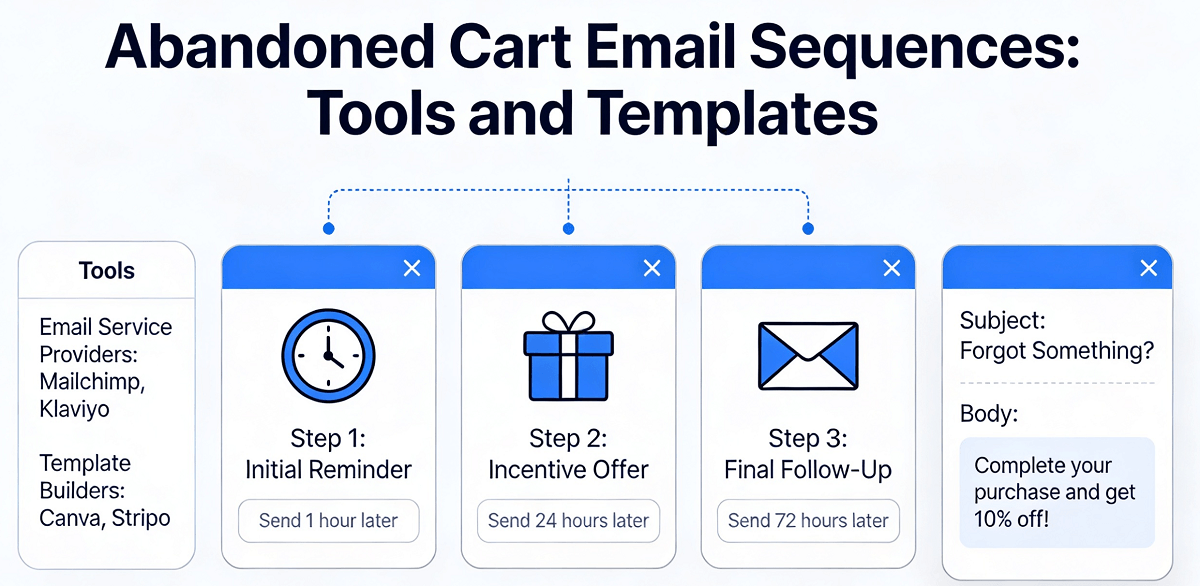
A typical sequence includes multiple emails sent over several days. The first email usually goes out within an hour of abandonment, the second a day or two later, and the final email a few days after that. Each email has a different purpose, from reminding customers about their cart to offering an incentive to complete the purchase.
The beauty of this system is that it works automatically once you set it up. You write the emails once, configure the automation, and then the system sends them to every abandoned cart without you lifting a finger. This makes it one of the most cost-effective marketing strategies available, with some studies showing return on investment of up to 36 dollars for every dollar spent on abandoned cart emails.
Step-by-Step Guide to Setting Up Your Abandoned Cart Email Sequence
Step 1: Choose the Right Email Marketing Platform
The first thing you need is an email marketing platform that supports abandoned cart automations. If you are using Shopify, the built-in email tools or apps like Smile can help. For WordPress WooCommerce users, plugins like AutomateWoo or Email Cart Recover provide similar functionality. Other popular options include Klaviyo, Mailchimp, and Omnisend, which all have dedicated abandoned cart features.
When choosing a platform, consider factors like ease of use, cost, and integration with your e-commerce store. Many platforms offer free plans for small businesses, with paid plans starting at reasonable monthly fees. Singapore business owners should also check if the platform supports local payment methods and provides customer support in your time zone.
Step 2: Capture Email Addresses from Visitors
To send abandoned cart emails, you first need to collect email addresses from people who visit your store. Most e-commerce platforms do this automatically when customers add items to their cart or begin checkout. However, if you want to capture emails from browsers who have not started checkout yet, you can use exit-intent popups or email capture forms on your website.
Make sure your email capture forms are simple and non-intrusive. Ask only for the email address initially, and let customers know what they will receive by signing up, such as exclusive discounts or early access to sales. A clear value proposition encourages more people to share their email addresses.
Step 3: Design Your First Abandoned Cart Email
The first email in your sequence is the most important one. It should be sent within one hour of cart abandonment to keep your brand fresh in the customers mind. Here is what to include in this email.
Start with a friendly subject line that references the abandoned items. Good examples include 'You left something behind,' 'Your cart is waiting,' or 'Complete your purchase of [item name].' Keep subject lines under 50 characters to ensure they display fully on mobile devices.
The email body should start with a warm greeting using the customers name if you have it. Then show a clear image of the abandoned product, its name, and its price. Include a prominent call-to-action button that says something like 'Return to Cart' or 'Complete Your Purchase.' The button should link directly to the checkout page with the abandoned items already saved.
Keep the email focused on one goal: getting the customer back to complete their purchase. Avoid adding too many links or distracting content that might pull them away from the main action.
Step 4: Create Your Second Email (The Reminder)
The second email should be sent 24 to 48 hours after the first one. By this time, the customer has had time to think about their purchase but may have forgotten about your store. This email serves as a gentle reminder.
In this email, highlight any benefits of the product they left behind. If you have added new reviews or testimonials since they last visited, mention those. You can also include social proof by showing how many people have purchased the same item or listing positive ratings.
Consider adding a sense of urgency, such as mentioning that stock is limited or that the offer expires soon. However, be careful not to create false urgency, as this can damage trust with your customers. Only use genuine reasons for urgency, such as real inventory limits or time-sensitive promotions.
Step 5: Create Your Final Email (The Incentive)
The third and final email in your sequence should be sent three to five days after abandonment. By this point, the customer has had ample time to consider their purchase, and a gentle push might be what they need to convert.
This is where you can offer a small incentive to encourage completion. This might be a discount code for a percentage off their order, free shipping on their completed purchase, or a small gift with their order. The incentive does not have to be large; even something like 5-10% off can be effective.
Along with the incentive, remind the customer of the value they will receive from the product. Address any potential objections they might have, such as return policies or security guarantees. End the email with a clear call-to-action and a direct link to complete their purchase.
Essential Elements of Effective Abandoned Cart Emails
Across all your emails, certain elements will improve your results. Use high-quality product images that clearly show what the customer is buying. Personalize the emails with the customers name and reference to specific items they abandoned. Keep your emails short and focused, with the most important information above the fold on mobile devices.
Your emails should look professional and match your brand identity. Use consistent colors, fonts, and logos across all communications. Make sure every email is mobile-responsive, as many Singapore shoppers browse and buy on their phones. Test your emails on different devices and email clients before launching your sequence.
Always include a clear unsubscribe link and respect customer preferences. If a customer opts out of cart emails, remove them from your sequence immediately. Maintaining clean email lists improves deliverability and keeps your sender reputation intact.
Tools and Templates for Singapore Business Owners
You do not need to start from scratch when building your abandoned cart email sequence. Many tools and templates are available to help you get started quickly.
Shopify merchants can use the built-in Abandoned Checkout feature in Shopify Email, which is free for basic usage. Simply go to your Shopify admin, navigate to Marketing, and set up automated emails for abandoned checkouts. Shopify provides templates that you can customize with your brand colors and messaging.
WooCommerce users can install free plugins like WooCommerce Abandoned Cart Recovery or Jilt. These plugins track cart abandonment and send customizable email sequences. Jilt offers a free plan for up to 500 subscribers, making it accessible for small businesses.
For multi-platform users, Klaviyo and Omnisend integrate with most major e-commerce platforms and provide sophisticated abandoned cart automation. They offer pre-built templates and drag-and-drop editors that make creating professional emails easy without any coding knowledge.
Measuring Your Success
Once your abandoned cart sequence is live, track its performance to understand what is working and what needs improvement. Key metrics to monitor include email open rate, which tells you if your subject lines are compelling, click-through rate, which shows if your email content drives action, conversion rate, which measures how many emails result in completed purchases, and revenue recovered, which calculates the actual sales you have regained.
A healthy abandoned cart email sequence typically achieves open rates of 40-60%, click-through rates of 10-20%, and conversion rates of 5-15% depending on your industry and product prices. If your numbers are significantly lower, consider testing different subject lines, adjusting send times, or revising your email content.
Regularly review and optimize your emails based on the data you collect. Small improvements in open rates and conversion rates can add up to significant revenue gains over time.
Common Mistakes to Avoid
Many business owners make mistakes that reduce the effectiveness of their abandoned cart emails. Sending emails too frequently can annoy customers and lead to unsubscribes. Sending too few emails means you miss opportunities to recover sales. Not testing your emails means you miss out on optimizations that could improve your results.
Avoid using deceptive subject lines that promise things you cannot deliver. Customers quickly lose trust in brands that use clickbait tactics. Do not include too many products or promotions in a single email, as this distracts from the main call-to-action. Finally, make sure your emails actually work by testing every link and button before activating your sequence.
If you still need help, feel free to contact us at https://webcare.sg/contact for a free website health check.