Choose the Right WordPress Hosting Plan: Shared vs VPS vs Managed
In the digital universe, your website is a ship, and its hosting is the engine. Choosing the right engine is the difference between a sleek yacht and a leaky rowboat. The wrong hosting can lead to a slow, insecure, and unreliable website, while the right one ensures a fast, stable, and scalable platform for your business to grow. With countless options on the market, understanding the fundamental differences between hosting types is the first step toward making a smart, long-term decision. This guide will provide practical guidance to help you match your WordPress hosting to your site's traffic, budget, and technical needs, ensuring your website is built on a solid foundation. This is a crucial step to follow before you get to the point of needing to fix website downtime and server errors.
Understanding Hosting Types: A Quick Comparison
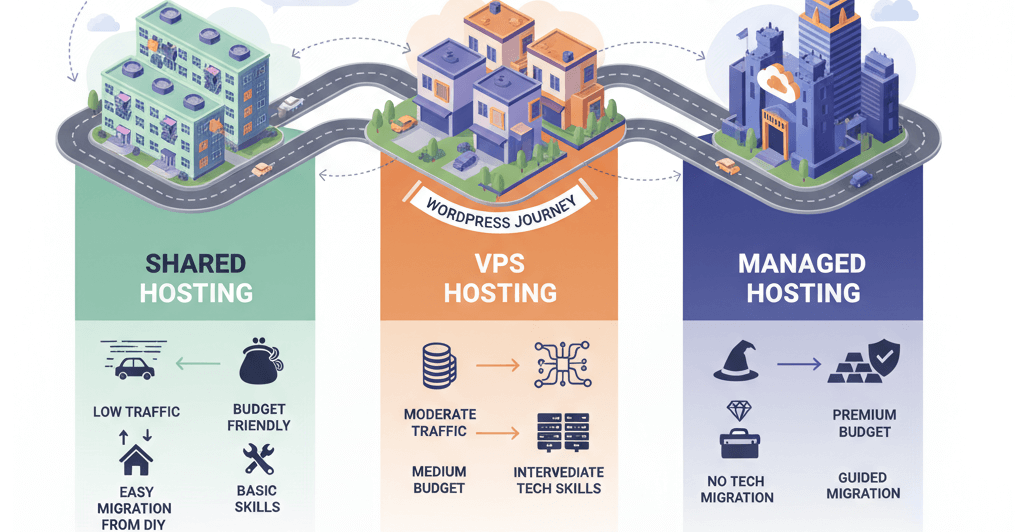
The three most common types of hosting for WordPress are Shared, Virtual Private Server (VPS), and Managed. Each has its own set of pros and cons, and the right choice depends on your current situation and future growth plans. Think of this decision as an essential part of your server maintenance checklist.
1. Shared Hosting: The Apartment Building
Shared hosting is the most common and budget-friendly option. Your website lives on a server with hundreds or even thousands of other websites, sharing resources like CPU, RAM, and disk space. This is a great starting point for new websites, blogs, and small businesses with low to moderate traffic. However, it can lead to performance issues if another website on your server experiences a traffic spike.
- Pros: Very low cost, easy to set up, no technical expertise required.
- Cons: Limited resources, can be slow, less secure, prone to server overloads.
- Best For: Small personal blogs, new businesses, and hobby sites.
2. VPS Hosting: The Condominium
VPS hosting offers a significant upgrade from shared hosting. While you still share a physical server with other users, you are given a dedicated virtual partition with its own allocated resources. This provides greater control, better performance, and enhanced security without the high cost of a dedicated server. You can think of it as a virtualized version of a dedicated server. This is a good option if your website has grown to a point where you need to start to fix slow website performance.
- Pros: More control and customization, better performance and reliability, enhanced security.
- Cons: More expensive than shared hosting, requires some technical knowledge to manage.
- Best For: Growing businesses, e-commerce stores, and websites with moderate traffic.
3. Managed WordPress Hosting: The All-Inclusive Resort
Managed hosting is a premium service specifically optimized for WordPress. The hosting provider handles all the technical aspects for you, including security updates, backups, performance optimization, and server maintenance. This allows you to focus on your content and business without worrying about the backend. The host often uses high-performance technology to ensure your website is fast and reliable. This can be a great option for businesses that want to focus on their content and not have to deal with technical issues, as noted in our guide on 5 signs your website needs maintenance.
- Pros: Blazing fast performance, top-notch security, expert support, automated backups, and updates.
- Cons: More expensive than shared and VPS hosting, less control over the server environment.
- Best For: High-traffic websites, e-commerce stores, and businesses that value reliability and expert support.
Practical Guidance and Migration Tips
Once you've made your decision, you'll need to migrate your website. Most managed hosting providers and many VPS providers offer a free migration service. If they don't, you can use a plugin like All-in-One WP Migration to do it yourself. This is a crucial step and can cause a lot of problems if not done correctly, as highlighted in our guide on how to update your website without breaking it. No matter what, you should always have a backup of your website before you start.
After migration, a final step is to improve your website's performance by setting up caching. This is a simple but powerful fix. See our guide on how to configure WordPress caching plugins for help with this.
When to Call the Experts
While this guide provides a solid framework, choosing and migrating to the right hosting can be a complex decision. If you are not confident in your technical abilities, are unsure about your traffic needs, or are experiencing persistent issues with your current host, it's time to seek professional help. An expert can assess your website's needs, recommend the best hosting plan, and ensure a smooth migration without any downtime. This is one of the clearest 5 signs you need professional help to fix your website.
If you’re still having trouble, don’t worry! WebCare SG is here to help. Contact us today for fast and reliable website fixes.
Related WebCare Solutions
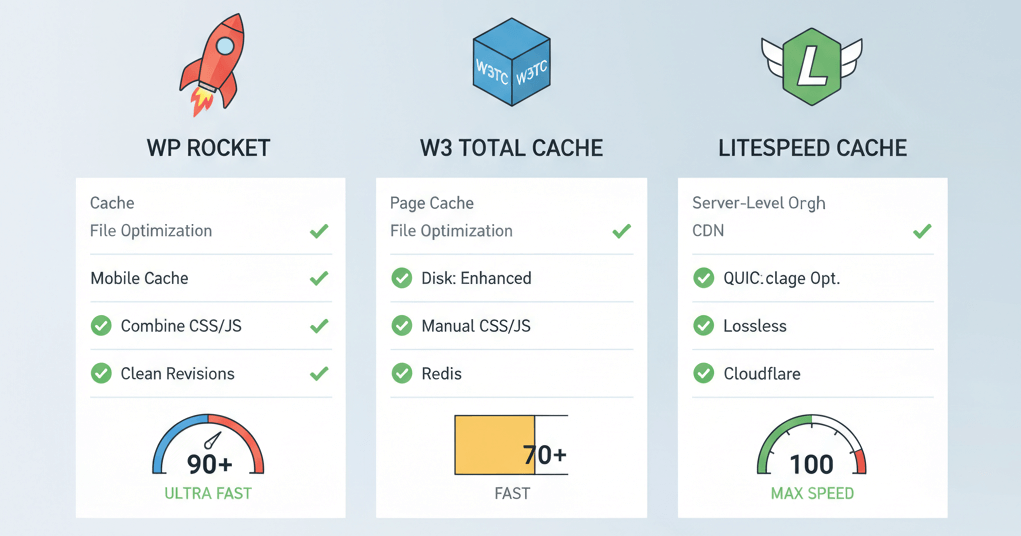
Configure WordPress Caching: Optimal Settings for Speed and SEO
A practical guide comparing popular WordPress caching plugins and providing optimal settings for page, object, and browser caching to drastically improve website speed and user experience.

Server Maintenance Checklist: Essential Steps for Optimal Performance
Stay ahead of potential issues with a server maintenance checklist. Learn essential steps, from backups to security checks, to ensure optimal server performance

Strengthening Website Security Against 2025 Threats
A comprehensive 2025 guide to protecting your website from modern cyber threats using MFA, firewalls, and proactive defense strategies.
Ready to get started?
Focus on your business while we fix your website. Contact WebCareSG today for fast, reliable solutions!
Whatsapp us on