The Shift from SEO to GEO (Generative Engine Optimization)
Search is evolving. With the introduction of Google AI Overviews, users are now receiving instant, synthesized answers directly at the top of the search results page. To remain visible, website owners must move beyond traditional keyword stuffing and embrace "Generative Engine Optimization." This means making your content easily "extractable" for AI bots. If your site isn''t appearing in these summaries, it might be time to how to conduct website audit tools steps to identify visibility gaps.
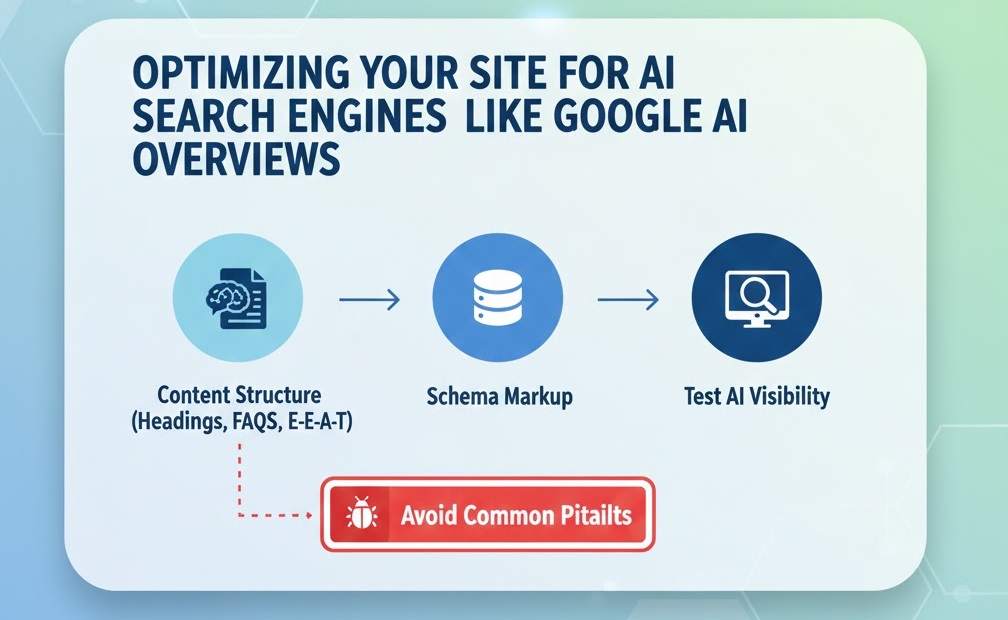
Step 1: Structuring Content for AI Extraction
AI models like Gemini and ChatGPT thrive on clear hierarchy and modular data. They parse it for specific data points rather than reading like a human.
- Question-Based Headings: Use H2 and H3 tags that mirror common user questions. This helps the AI pinpoint your content as a direct answer.
- The "Answer Box" Technique: Start your sections with a concise, 40-60 word summary that answers the primary question.
- Lists and Tables: Use bulleted lists for steps and HTML tables for comparisons. AI search engines favor these formats because they provide high "information gain."
- Paragraph Brevity: Keep paragraphs between 2-4 sentences. If your layout feels cluttered, follow these tips to how to fix poor mobile responsiveness.
Step 2: Strengthening E-E-A-T Signals
AI search engines use Google''s E-E-A-T (Experience, Expertise, Authoritativeness, Trustworthiness) guidelines as a primary filter to avoid spread of misinformation.
- Detailed Author Bios: Every article should have a clear byline linking to a profile that highlights credentials.
- First-Person Experience: Use phrases like "In my experience." AI prioritizes human-led insights. If you need help proving your site is a trusted source, check our guide on 5 signs you need professional help to fix website.
- Citations: Link to high-authority external sites to signal that your content is backed by established facts.
Step 3: Implementing Schema Markup (Without Coding)
Schema markup is the "language" of AI. It provides machine-readable context about your page.
- FAQ Schema: Tells AI exactly which questions you are answering. Use plugins like Yoast or Rank Math to add this.
- How-To Schema: Perfect for tutorials. This increases the chance of your steps being cited. If your schema is not showing, you may need to improve website crawlability indexing.
Step 4: Testing Your AI Visibility
- Manual Prompt Testing: Use Gemini or ChatGPT to ask questions related to your niche. See if your brand is mentioned.
- Google Search Console: Monitor for "Impressions" on conversational queries. If you notice a drop, look into fix page not indexed google search console.
- Competitor Gaps: Identify where competitors are being cited. Often, it''s because they have a better importance of robots txt configuration.
Step 5: Avoiding AI-Resistant Pitfalls
- Slow Load Times: AI bots prioritize fast pages. If your site is sluggish, you must speed up your site.
- Broken Internal Links: Use a tool to identify fix broken internal links to ensure bots can navigate your site.
- Technical Downtime: Refer to how to fix website downtime server errors 500 502 503 to maintain accessibility.
Optimizing for AI search is the key to future-proofing your traffic. If you need help with a comprehensive AI-readiness audit, WebCare SG is here to guide you. Contact us today.