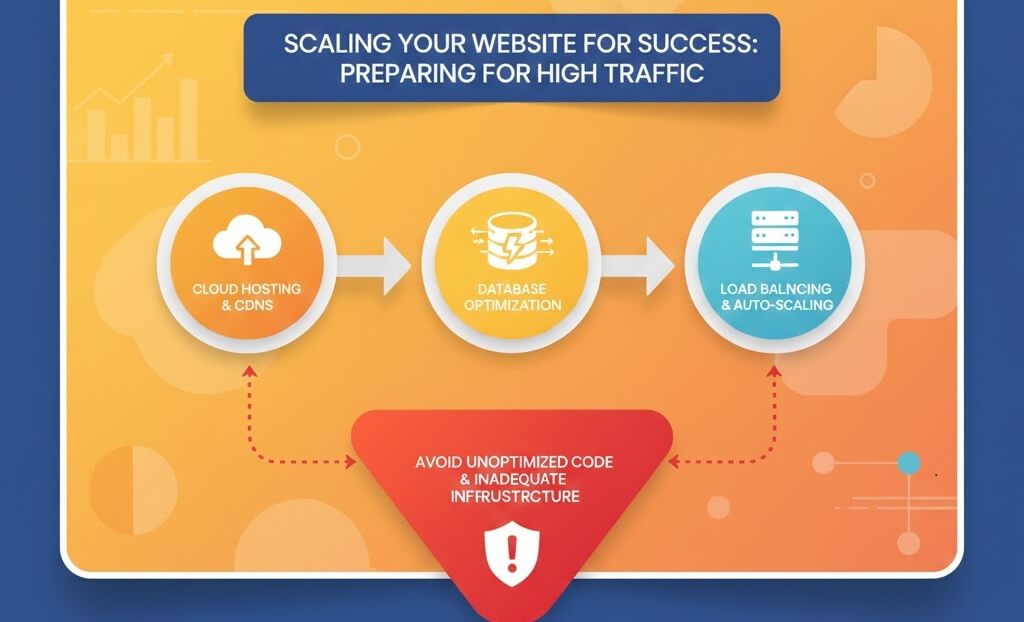
Preparing for the "Good" Problem: High Traffic
Whether it is a viral social media post, a Black Friday sale, or a successful ad campaign, sudden traffic spikes can be a double-edged sword. If your infrastructure isn''t ready, your site will crash, leading to lost revenue and a damaged brand reputation. Scaling is about ensuring your site can handle 10,000 visitors as smoothly as it handles 10. This requires proactive maintenance and an understanding of how to fix slow website performance before the rush hits.
Step 1: Database Optimization and Cleanup
During high traffic, the database is often the first thing to fail. Every time a user loads a page, the server makes a "request" to the database. If your database is cluttered, these requests take longer, eventually leading to a total shutdown.
- Clean Up Overhead: Remove old post revisions, expired transients, and spam. Learn how to remove spam comments from wordpress to keep your tables lean.
- Indexing: Ensure your database tables are properly indexed so the server can find data faster.
- Repair Tables: If you suspect corruption, you must how to fix database connection errors before the traffic arrives.
Step 2: Implementing Load Balancing and Cloud Scaling
A single server has a physical limit. Load balancing distributes incoming traffic across multiple servers, ensuring no single unit is overwhelmed.
- Horizontal Scaling: Adding more servers to your pool (using a cloud provider like AWS or Google Cloud).
- Vertical Scaling: Increasing the RAM and CPU of your existing server. This is a key part of your server maintenance checklist.
- Failover Systems: Ensure that if one server fails, another takes over instantly to prevent website downtime server errors 500 502 503.
Step 3: Edge Caching and Global Content Delivery
The best way to handle high traffic is to prevent the request from ever reaching your main server. This is achieved through aggressive caching.
- Static Caching: Convert dynamic PHP pages into static HTML. This can drastically speed up your site.
- Use a CDN: A Content Delivery Network stores copies of your site in data centers around the world. This is essential for maintaining a global presence and helps reduce bounce rate by improving website speed.
- Object Caching: Use tools like Redis or Memcached to store frequent database queries in the server''s RAM.
Step 4: Stress Testing Your Infrastructure
You shouldn''t wait for a real spike to see if your site will hold up. Use load-testing tools to simulate thousands of users.
- Identify Bottlenecks: Does the site slow down at 500 users? 1,000? Knowing your limit allows you to set up auto-scaling rules.
- Monitor Mobile Response: High load can often break mobile layouts first. Check is your website mobile-friendly under stress.
- Check for 404s: High traffic will amplify the impact of broken assets. Use a tool to identify fix broken internal links before they drain your server resources.
Step 5: Monitoring and Real-Time Support
During the actual traffic event, you need real-time eyes on your server logs and performance metrics.
- Uptime Alerts: Set up instant notifications. If your site goes down, you need to know how to troubleshoot fix website downtime in seconds.
- Security Monitoring: High-traffic events are often targets for hackers. Follow how to secure your website against basic threats to prevent a DDoS attack from being mistaken for real traffic.
- Post-Event Audit: Once the traffic subsides, conduct a website audit to see how the system performed and where you can improve for the next spike.
Scaling a website for massive success is a technical challenge that requires precision. If you are expecting a major surge in traffic and aren''t sure if your current hosting can handle it, or if you''re seeing 5 signs website needs maintenance, don''t leave it to chance. WebCare SG specializes in high-performance scaling and emergency server support. Contact us today to ensure your site stays online when it matters most.