Preparing Your Website for Voice Search and Mobile AI Assistants
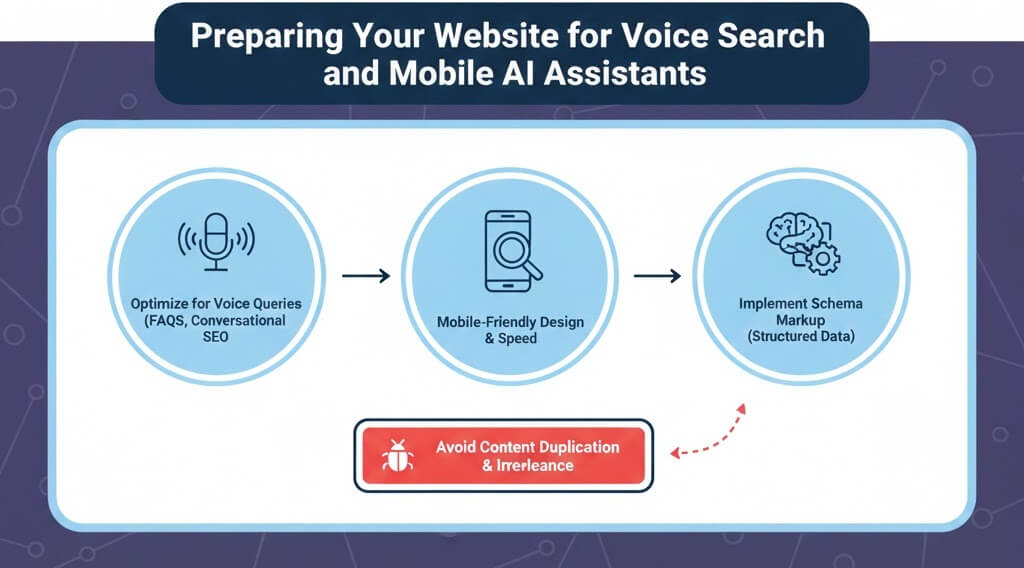
The Era of Voice-First Search
By 2025, voice search has evolved from a novelty into a primary way users interact with the web. Whether it''s Siri on an iPhone, Alexa in the kitchen, or Google Assistant on a smartwatch, people are moving away from fragmented keywords like "best plumber SG" and toward natural, full-sentence questions like "Who is the best plumber near me that is open now?" To stay visible, your SEO strategy must shift toward natural language processing. This is a critical part of fixing poor seo optimization in the modern age.
Step 1: Mastering Conversational and Long-Tail Keywords
Voice searches are typically longer and more specific than typed queries. They often start with "who," "what," "where," "when," "why," and "how."
- Target Full Questions: Instead of targeting "web design tips," target "How do I make my website faster for mobile users?"
- Use Natural Language: Write content that sounds like a person speaking. Avoid corporate jargon.
- Audit Your Keywords: Use tools like AnswerThePublic to see what real questions people are asking about your industry. If your rankings drop after changing keywords, you may need to how to conduct website audit tools steps.
Step 2: Optimizing for Featured Snippets (Position Zero)
Voice assistants usually read only one result aloud: the Featured Snippet. To be that result, your content must be structured for immediate extraction.
- The "One-Breath" Answer: Provide a concise 40-50 word summary at the beginning of your articles that directly answers a specific question.
- Use Clear Formatting: Bulleted lists and numbered steps are highly favored by AI assistants. This also helps improve website crawlability indexing.
- H2 and H3 Headers: Phrase your subheadings as the questions you are answering.
Step 3: Strengthening Local SEO for "Near Me" Queries
Over half of voice searches have local intent. If you have a physical location or serve a specific area, your local presence is your lifeline.
- Claim Your Google Business Profile: Ensure your Name, Address, and Phone number (NAP) are identical across the web. Discrepancies can lead to search engines skipping your site.
- Add Local Landmarks: Use conversational phrases like "We are located just two blocks from the Merlion Park."
- Focus on Reviews: AI assistants prioritize businesses with high ratings and recent reviews. If your site is suffering from negative spam reviews, learn how to remove spam comments from wordpress.
Step 4: Implementing Technical Schema for Voice
Schema markup helps AI understand the context of your data. For voice, specific types of schema are non-negotiable.
- Speakable Schema: This tells Google Assistant which parts of your content are most suitable for being read aloud.
- FAQ Schema: A must-have for voice. It clearly maps questions to answers, making it easy for AI to cite your page.
- LocalBusiness Schema: Provides machine-readable data about your hours and location. If you encounter issues with your code snippets, refer to fix wordpress updating publishing failed error.
Step 5: Mobile Performance and Speed
Most voice searches happen on mobile devices. If your site takes more than 3 seconds to load, an AI assistant is unlikely to recommend it.
- Speed is Key: Use AI tools to speed up your site. This includes compressing images and minifying scripts.
- Responsive Design: Your site must be flawless on small screens. If not, follow our guide on how to fix poor mobile responsiveness.
- Uptime Monitoring: If your server is down when a voice query hits, you lose the lead. Check how to fix website downtime server errors 500 502 503 for stability tips.
Preparing for voice search is about making your website more human, faster, and easier to understand for both machines and people. If you find the technical side of schema or mobile optimization overwhelming, WebCare SG can help you future-proof your site. Contact us today for a free voice-readiness consultation.
Related WebCare Solutions

How to Identify and Clean Malware from Your WordPress Website
Learn the essential steps to clean up malware from your WordPress site and secure it for the future. A practical guide for website owners.

Why is My Contact Form Not Working? Troubleshooting Guide
Discover common reasons why your website contact form might not be working and learn how to troubleshoot email settings, plugin configurations, and server issues.

When Should You Hire a Website Repair Expert?
Learn the key signs indicating it's time to bring in professional website repair experts to resolve complex or persistent issues.
Ready to get started?
Focus on your business while we fix your website. Contact WebCareSG today for fast, reliable solutions!
Whatsapp us on