If you run a business website in Singapore, you probably already know that social media icons are important. But here is what many small business owners quickly discover: placing those little icons in the wrong spot can cost you clicks, followers, and ultimately customers. Most Singapore business owners add social media icons to their website without much thought, only to wonder later why no one is actually clicking on them. The truth is, where you place your social media icons matters just as much as whether you have them at all. This guide will walk you through exactly where to put social media icons on your Singapore business website so you can get the maximum number of clicks and grow your online following effectively.
Understanding why social media icon placement matters starts with thinking about how your visitors behave. When someone lands on your website, their eyes naturally scan the page in predictable patterns. The most common pattern follows an F-shape, meaning visitors look horizontally across the top of the page first, then down the left side, and occasionally across content areas. If your social media icons are buried at the bottom of the page where nobody looks, you are missing out on valuable opportunities to connect with potential customers who already showed interest by visiting your site. In Singapore is competitive market, every click matters, and getting your social media icons in front of visitors at the right moment can make the difference between a follower who never engages and one who becomes a loyal customer.
Before we get into specific placement recommendations, let us clarify which social media platforms you should actually be using. Not every business needs every platform. For most Singapore small businesses, focusing on Facebook, Instagram, LinkedIn, and your preferred platform makes the most sense. Facebook remains the dominant platform for reaching Singaporeans across all age groups, while Instagram is essential if you target younger customers or run a visually-focused business like restaurants, salons, or retail stores. LinkedIn works best for B2B businesses and professional services. Add your icons only for the platforms where you actively post content and respond to comments. Dead or inactive social media accounts linked from your website actually hurt your credibility rather than help it.
The Header Placement: Your Primary Click Location
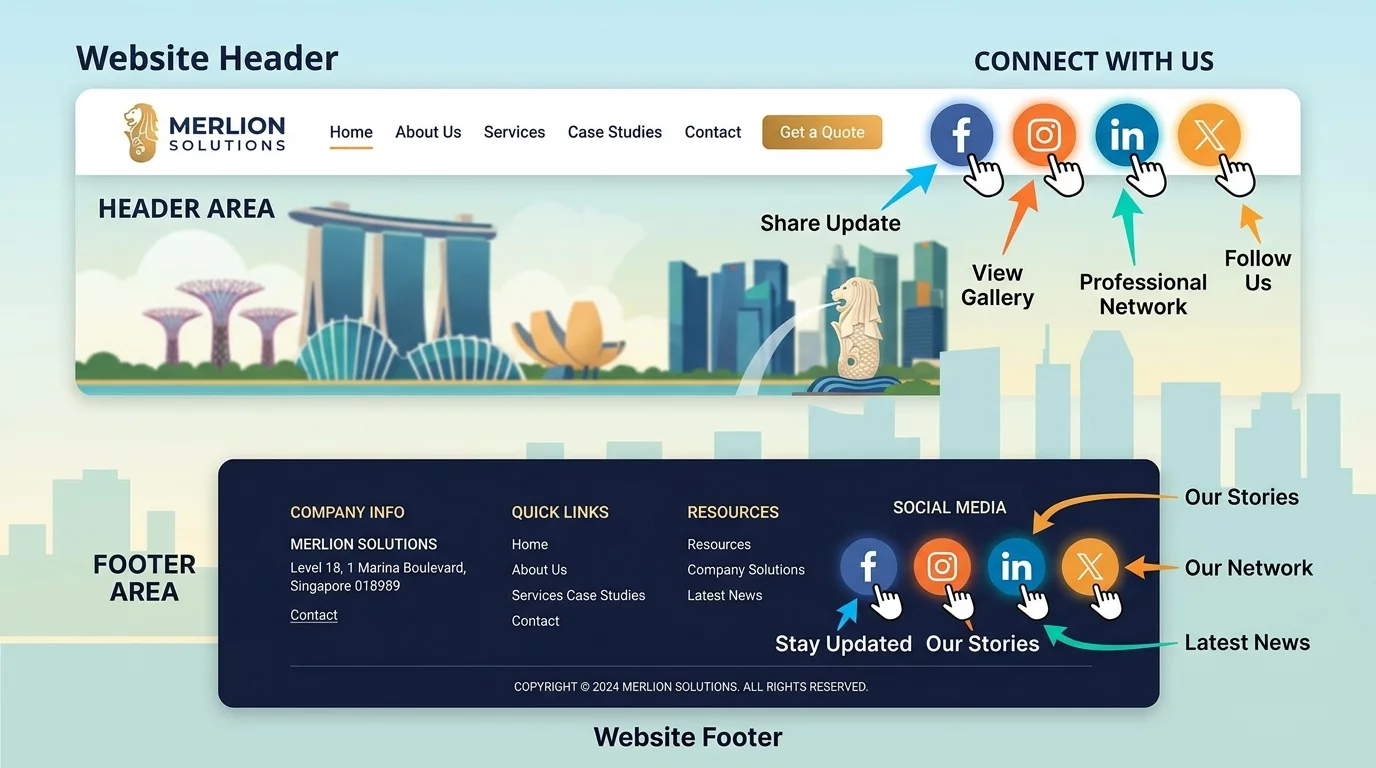
The header of your website is the single most valuable real estate for social media icons. This area appears on every single page of your website, making it the most consistent and persistent placement. Most visitors first look at the top of the page when they arrive, trying to orient themselves and understand what the website is about. If your social media icons sit quietly in the header, right next to your logo or navigation menu, you capture visitors who are already in an exploratory mindset and curious about your business.
When placing icons in your header, aim for the right side of your logo or in the top right corner of the page. This positioning works well because it does not interfere with your logo or main navigation, yet it remains highly visible without being obtrusive. The key is to keep the icons small but clearly visible. Many Singapore business owners make the mistake of making icons too tiny, almost hidden in the design, which defeats the entire purpose. Use icons that are at least 24 pixels in size, with enough spacing between them that visitors can easily tap or click without accidentally hitting the wrong one.
One important consideration for header placement is mobile responsiveness. If your website header transforms significantly on mobile devices, you need to ensure your social media icons remain visible and tappable on smaller screens. Test your website on your own phone to confirm that the icons are not hidden behind a hamburger menu or too small to tap comfortably. Mobile users in Singapore make up a significant portion of web traffic, so ignoring mobile placement means missing more than half your potential clicks.
The Footer Placement: The Reliable Backup
While the header gets the most attention, the footer is actually the second most important place for social media icons. Most Singapore website visitors do not immediately scroll to the footer on their first visit, but when they reach the end of a page and have not yet taken the action you wanted them to take, the footer gives them a last chance to connect with you on social media. This is especially valuable for visitors who read your content from start to finish and are genuinely interested in your business.
Place your social media icons in the footer alongside your contact information, business address, and other useful links. This creates a natural cluster of information that visitors expect to find at the bottom of web pages. Singapore businesses often include their UEN number and GST registration details in the footer as well, and adding social media icons in this area feels natural and professional. Keep the same sizing standards from the header, and consider using the same icon design to maintain visual consistency across your website.
The footer placement also works well because it does not compete with your main calls to action. Some visitors arrive at your page with no intention of contacting you, subscribing to your newsletter, or making a purchase on that specific visit. But they might still be willing to follow you on Instagram or like your Facebook page. Footer placement captures these visitors without distracting them from whatever action you most want them to take.
The Contact Page: High Intent Placement
Your contact page deserves special attention for social media icon placement. Visitors who navigate specifically to your contact page are showing high intent. They want to reach you, they are seriously considering working with you, or they have a question they need answered. These visitors are your warmest leads, and giving them an easy way to follow you on social media creates multiple touchpoints for building a relationship.
Add social media icons prominently at the top of your contact page, above your contact form and business details. You can also include them below your contact information as a secondary reminder. Some Singapore businesses choose to embed their Facebook page or Instagram feed directly on the contact page, giving visitors a preview of the kind of content they would see if they followed. This works particularly well for businesses like restaurants, event venues, or retail shops where visual content matters significantly.
The About Page: Storytelling Opportunity
The About page is another excellent location for social media icons because it is where you tell your business story and connect emotionally with visitors. By the time someone reads your About page, they have already decided you are worth learning more about. Adding social media icons here lets them continue the relationship in a space where they already feel some connection to your brand.
Place icons near the end of your About page content, perhaps after your mission statement or team introduction. You can also include a small call-to-action phrase like "Follow us on social media for behind-the-scenes updates" to make the icons feel less like random decorations and more like an invitation to join your community. Singapore consumers increasingly value authentic, personal connections with businesses, and the About page is where you establish that humanity.
Using Floating or Sticky Social Media Bars
Some website builders and WordPress themes offer floating or sticky social media bars that stay visible as visitors scroll down the page. These can be placed on the left side of the screen or the right side, and they remain in view regardless of how far down the visitor scrolls. This approach guarantees that your social media icons are always visible without taking up valuable content space.
Floating bars work particularly well for content-heavy websites like blogs or resource pages. If you publish articles regularly, a floating social media bar ensures that readers can share your content or follow your profiles at any point during their reading session. However, be cautious about making floating bars too intrusive. If they cover important content or distract visitors, they can actually hurt your website is usability and drive people away rather than encouraging them to click.
Inline Placement Within Content
For blog posts and longer content pages, placing social media icons at the end of each article captures readers who finished consuming your content. These visitors have already invested time in what you wrote, which demonstrates genuine interest. Offering them an easy way to follow you on social media is a natural next step that many Singapore content creators overlook.
Include share buttons for content sharing as well as follow icons for profile following. Share buttons let readers distribute your content to their own social networks, which expands your reach far beyond your existing followers. This is especially valuable if you publish articles with practical tips or本地 content that Singapore readers would find useful to share with their own friends and colleagues.
Testing and Measuring Your Results
Placement alone is not enough. To truly maximize clicks, you need to test different positions and measure which ones perform best for your specific audience. Google Analytics can show you where on your page visitors click most frequently using page scroll and click tracking features. If you use Google Tag Manager, you can set up custom events to track exactly how many times each social media icon gets clicked.
Take screenshots of your current social media icon placement across different pages and save them as a baseline. Make one change at a time, whether that is moving icons from the footer to the header, resizing them, or adding them to a new page. Wait at least two weeks before evaluating results to ensure you have enough data to make an informed decision. Singapore web traffic patterns can vary significantly between weekdays and weekends, so give your test enough time to capture both patterns.
Also pay attention to which platforms get the most clicks. If your Instagram icon gets clicked ten times more often than your LinkedIn icon, it tells you where your audience is most active. Use this information to prioritize the platforms that matter most to your business and consider removing or hiding icons for platforms where almost nobody clicks.
Common Mistakes to Avoid
One of the biggest mistakes Singapore business owners make is placing social media icons that are too small to see or click comfortably. With so much screen space available, there is no excuse for icons that require squinting or precise tapping. Another common error is using icons that do not actually link to your social media profiles. Broken or incorrect links mean visitors click expecting to go to your Facebook page and end up on a 404 error page instead. Test every single icon on every device you support.
Another mistake is overloading your website with social media icons from fifteen different platforms. This looks cluttered, unprofessional, and confuses visitors about where they should actually connect with you. Stick to the three or four platforms where you are most active and where your target customers actually spend time. Quality connections on a few platforms always beat weak presence on many platforms.
If you still need help, feel free to contact us at https://webcare.sg/contact for a free website health check.