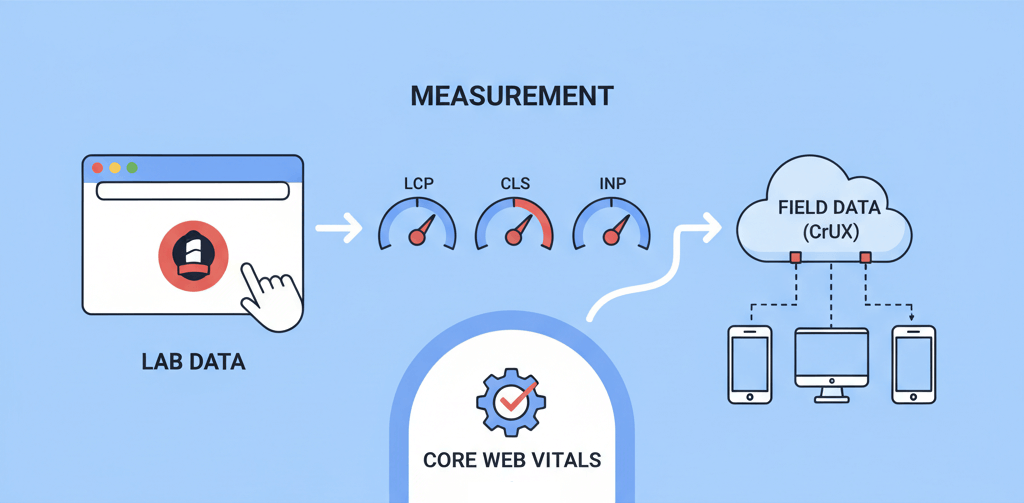
Google’s Core Web Vitals have become a cornerstone of website optimization, directly influencing user experience and search engine rankings. These three key metrics—Largest Contentful Paint (LCP), First Input Delay (FID, now being replaced by INP), and Cumulative Layout Shift (CLS)—measure how users perceive the performance, interactivity, and visual stability of your website. Improving these scores can lead to better rankings, lower bounce rates, and increased conversions. This guide will provide practical fixes for each of the Core Web Vitals, along with tips on how to measure your progress. For a deeper understanding of these metrics, refer to our article on Understanding Core Web Vitals and Its Impact on SEO.
Largest Contentful Paint (LCP): Making Your Website Load Faster
LCP measures how long it takes for the largest image or text block on your page to become visible to the user. A good LCP score is 2.5 seconds or less. A high LCP score is often a primary cause of high bounce rates. Here are some key fixes:
- Optimize Images and Other Media: Since images are often the largest element, optimizing them is crucial. Use modern formats like WebP or AVIF, and compress them to reduce file size. Ensure images are appropriately sized for their display area to avoid unnecessary downloads. Our guide on Optimizing Website Images Without Sacrificing Quality provides a detailed walkthrough.
- Optimize Your Server: A slow server response time is often the first bottleneck. Upgrading your hosting plan, using a Content Delivery Network (CDN) to serve content from a server closer to the user, and enabling server-side caching can significantly improve LCP.
- Minify CSS and JavaScript: Render-blocking CSS and JavaScript files can delay the loading of your content. Minify these files to remove unnecessary characters and use techniques like asynchronous loading to ensure they don't block the rendering of the LCP element.
- Implement Lazy Loading: For images and videos that appear below the fold, lazy loading can prevent them from impacting the initial load time. This ensures that the browser prioritizes the content that is immediately visible to the user.
Cumulative Layout Shift (CLS): Enhancing Visual Stability
CLS measures the visual stability of a page by quantifying unexpected layout shifts. A good CLS score is 0.1 or less. A high CLS score often occurs when elements on the page move around after the initial content has loaded, which can be frustrating and lead to accidental clicks. This is one of the more common common website errors.
- Set Image and Video Dimensions: Always specify the width and height attributes for images and video elements in your HTML. This allows the browser to reserve the correct amount of space for the media before it loads, preventing the content below it from shifting.
- Reserve Space for Ads and Iframes: If you use ads or iframes, ensure you reserve a fixed space for them. If their dimensions are unknown, place them in a container that has a defined size to prevent content from shifting when they load.
- Avoid Dynamic Content Insertion: Avoid injecting new content or a new element above existing content unless it's in response to a user's action. A common example is a cookie banner or a popup that appears at the top of the page after everything else has loaded, pushing the rest of the content down.
Interaction to Next Paint (INP): Improving Interactivity
INP measures the time it takes from when a user interacts with a page (e.g., a click or tap) to when the browser paints the next frame, showing the visual response. This metric is a more accurate replacement for First Input Delay (FID) and provides a comprehensive assessment of a page's overall responsiveness. A good INP score is 200 milliseconds or less. A poor INP score is one of the key factors that can cause your website to feel slow, even if the content loads quickly, a problem addressed in our guide on How to Fix Slow Website Performance.
- Optimize JavaScript Execution: A long-running JavaScript task can block the main thread, delaying a response to user input. Break up long tasks into smaller, asynchronous ones. Use code splitting and lazy loading for JavaScript to only load what is needed when it is needed.
- Limit Main Thread Work: Keep the main thread free to respond to user input. Defer non-critical CSS and JavaScript, and avoid complex or unnecessary animations that might block the thread.
- Optimize Your Server: A slow server response can also affect interactivity. A quick server response ensures the page can load all necessary resources for interactivity in a timely manner. Our guide on Server Maintenance Checklist provides more tips.
When to Call the Experts
While many of these fixes can be implemented with a basic understanding of web development, some are more complex and require professional expertise. For example, debugging render-blocking resources, optimizing a complex server, or restructuring your website's code to improve INP can be challenging. If you are struggling to get your scores into the "Good" range or if you can't pinpoint the cause of a specific issue using tools like Google Lighthouse, it's time to call a professional. These issues are similar to other problems that can occur during a website update, as highlighted in our guide on How to Update Your Website Without Breaking It.
If you’re still having trouble, don’t worry! WebCare SG is here to help. Contact us today for fast and reliable website fixes.